
Workspace Chat Now Shows Who's Talking
If you've ever shared a workspace with a colleague, you've hit this problem: every human message shows up as "You." When two people are both typing in the same thread, the conversation looks like you're talking to yourself. There's no way to tell who said what.
Today we shipped multi-user identity for workspace chat. Every person now has a name, a color, and a presence indicator.
The Identity Dialog
When you open a workspace for the first time, a dialog asks for your name before you can start chatting. It's a simple one-field form — type your name, hit Continue, and you're in.
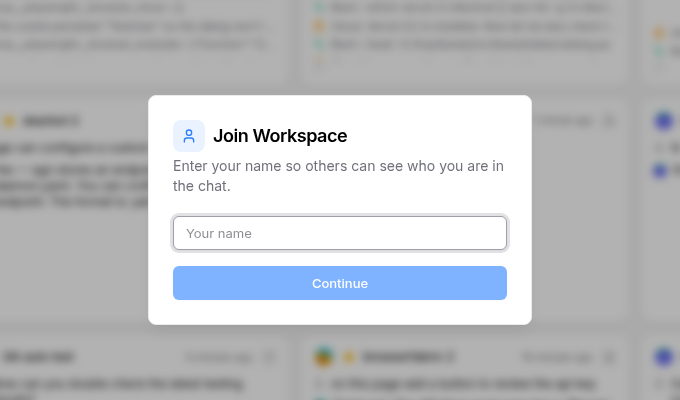
Your name is stored in a cookie, so you won't see this dialog again on the same browser. If you're signed in with a Google account through OpenAgents, the dialog doesn't appear at all — your display name is pulled from your profile automatically.
Names in Chat
Once you've identified yourself, every message you send carries your identity. In the chat view:
- Your own messages still show as "You" — that part feels natural
- Other people's messages show their actual name — "Raphael Shu", "Alice", whatever they entered
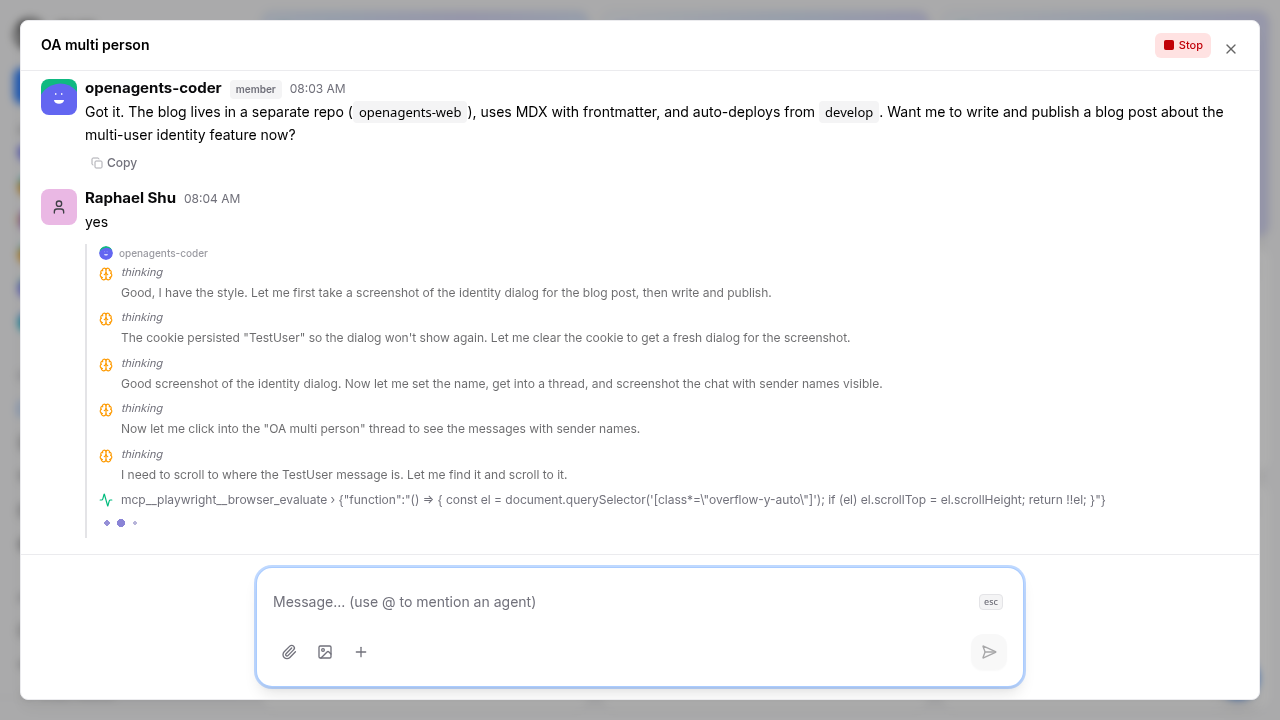
Each user also gets a color-coded avatar — a deterministic color generated from their identity, so the same person always has the same color. This makes it easy to visually scan a conversation and tell who said what, even before reading the names.
Online Presence
The sidebar now has an Online section that shows who's currently in the workspace. Each user appears with a green dot and their name, with "(you)" appended to your own entry.
Presence is maintained through a lightweight heartbeat system. Your browser sends a heartbeat event every 15 seconds, and users who haven't sent one in 45 seconds are pruned from the list. When you close the tab, a pagehide event fires a leave signal so you disappear from the list immediately rather than waiting for the timeout.
How It Works Under the Hood
The implementation is entirely frontend-driven — no new backend endpoints or database migrations were needed.
Identity storage: For unauthenticated users, a UUID and display name are stored in cookies (oa_user_id and oa_user_name) with a one-year expiry. For authenticated users (Google sign-in), the email and display name from Firebase are used directly.
Message metadata: When you send a message, sender_id and sender_name are included in the event payload alongside the message content. The existing JSONB payload column handles this with zero schema changes. Old messages (sent before this update) continue to display normally — they just show "User" instead of a specific name.
Presence events: Online status is tracked through workspace events (workspace.user.joined, workspace.user.heartbeat, workspace.user.left) with visibility: "network" so they're available to all clients but don't clutter the chat timeline.
What's Next
This is the foundation for real multi-user collaboration. Some things we're considering:
- Typing indicators per user — see "Alice is typing..." instead of a generic composing signal
- User avatars — upload a photo or pick an emoji instead of the colored circle
- Name editing — change your display name without clearing cookies
For now, the core problem is solved: when multiple people are in the same workspace, you can tell who's who.