
How to Install Claude Code (2026): macOS, Windows and Linux
本文也有中文版。
Claude Code is Anthropic's agentic coding tool. It runs in your terminal, reads your repository, edits files and runs commands. Installing it takes one command on most machines, but there are a few choices and a few traps: which installer to use, why claude is "not found" after a successful install, and which account actually works. This guide walks through all of it as of October 2026.
Before you start
Claude Code runs on macOS 13 or newer, Windows 10 1809 or newer (or Windows Server 2019+), Ubuntu 20.04+, Debian 10+ and Alpine Linux 3.19+. You need 4 GB of RAM, an x64 or ARM64 processor, an internet connection, and Bash, Zsh, PowerShell or CMD. Node.js is not required for the recommended installer.
You also need the right account. Claude Code works with a Claude Pro, Max, Team or Enterprise plan, or an Anthropic Console account billed by API usage. The free claude.ai plan does not include Claude Code. Companies can also run it through Amazon Bedrock, Google Cloud's Agent Platform or Microsoft Foundry.
Step 1: pick your install method
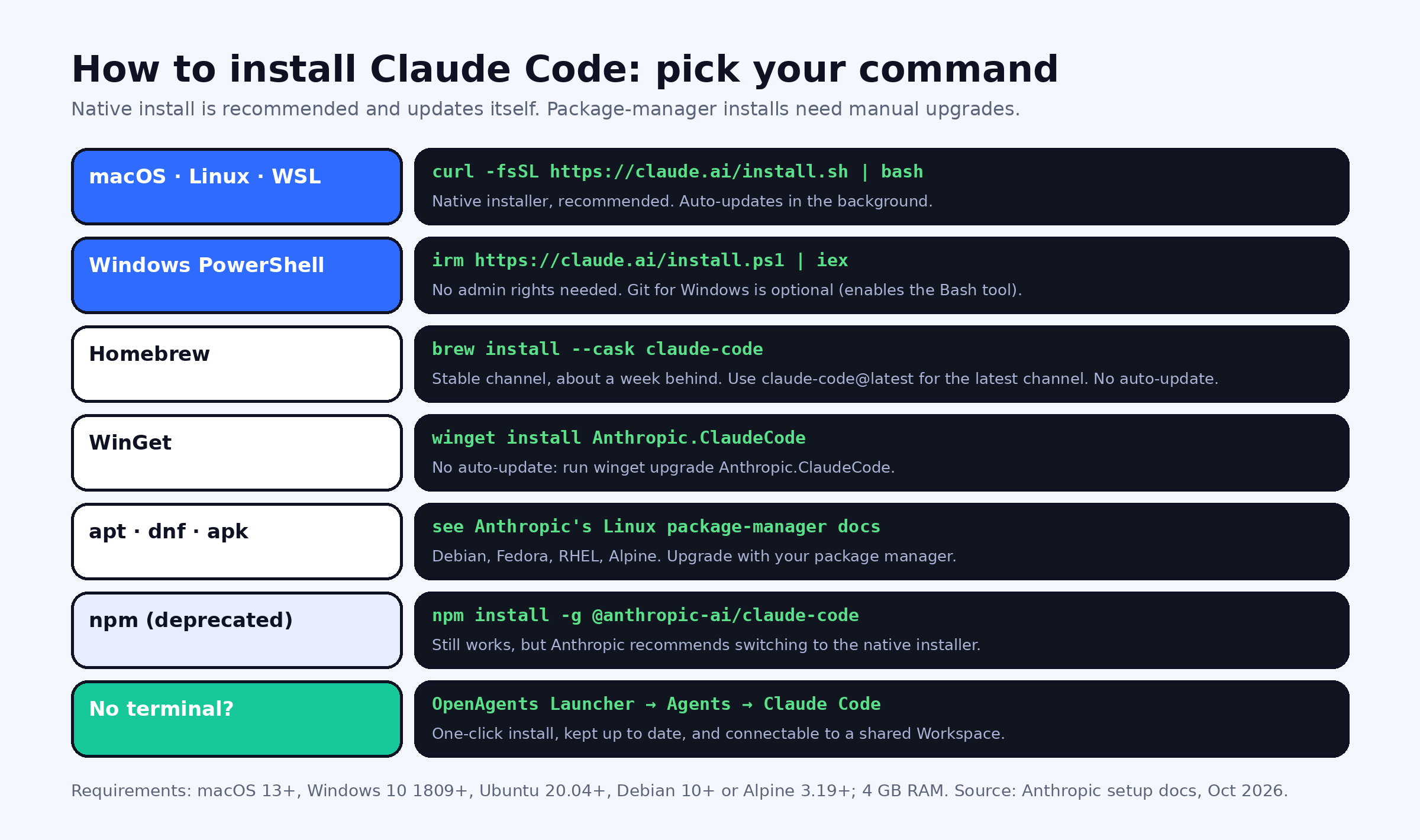
The native installer is the one to use. It needs no Node.js and updates itself in the background.
# macOS, Linux, WSL
curl -fsSL https://claude.ai/install.sh | bash
# Windows PowerShell (no admin rights needed)
irm https://claude.ai/install.ps1 | iex:: Windows CMD
curl -fsSL https://claude.ai/install.cmd -o install.cmd && install.cmd && del install.cmdThe installer prints nothing while it downloads, so give it a moment. On macOS and Linux it places the claude launcher at ~/.local/bin/claude.
Package managers work too, but they don't auto-update:
brew install --cask claude-code          # stable channel, about a week behind
brew install --cask claude-code@latest   # latest channel
winget install Anthropic.ClaudeCodeAnthropic also publishes apt, dnf and apk repositories for Debian, Fedora, RHEL and Alpine. Upgrade those with your package manager as usual.
npm still works but is deprecated. If you installed with npm install -g @anthropic-ai/claude-code in the past, switch to the native installer; it avoids Node version conflicts and permission errors on the global npm directory.
Windows: native or WSL?
Both work. Run the PowerShell installer for Windows-native projects. Install Git for Windows if you want Claude Code's Bash tool; without it, Claude Code runs shell commands through PowerShell. If your projects live in Linux, or you want sandboxed command execution, open your WSL 2 distribution and run the Linux installer there instead. Sandboxing is supported in WSL 2, not on native Windows or WSL 1.
Alpine and other musl-based distros
Install the runtime dependencies first: apk add bash curl libgcc libstdc++ ripgrep. Then run the Linux installer and set USE_BUILTIN_RIPGREP to 0 in your Claude Code settings so it uses the system ripgrep.
Step 2: verify the install
Open a new terminal window first. An already-open window keeps its old PATH and won't see the new command. Then run:
claude --version
claude doctor
A working install prints a version number. claude doctor gives a read-only health check of the install, update channel and settings, without starting a session:
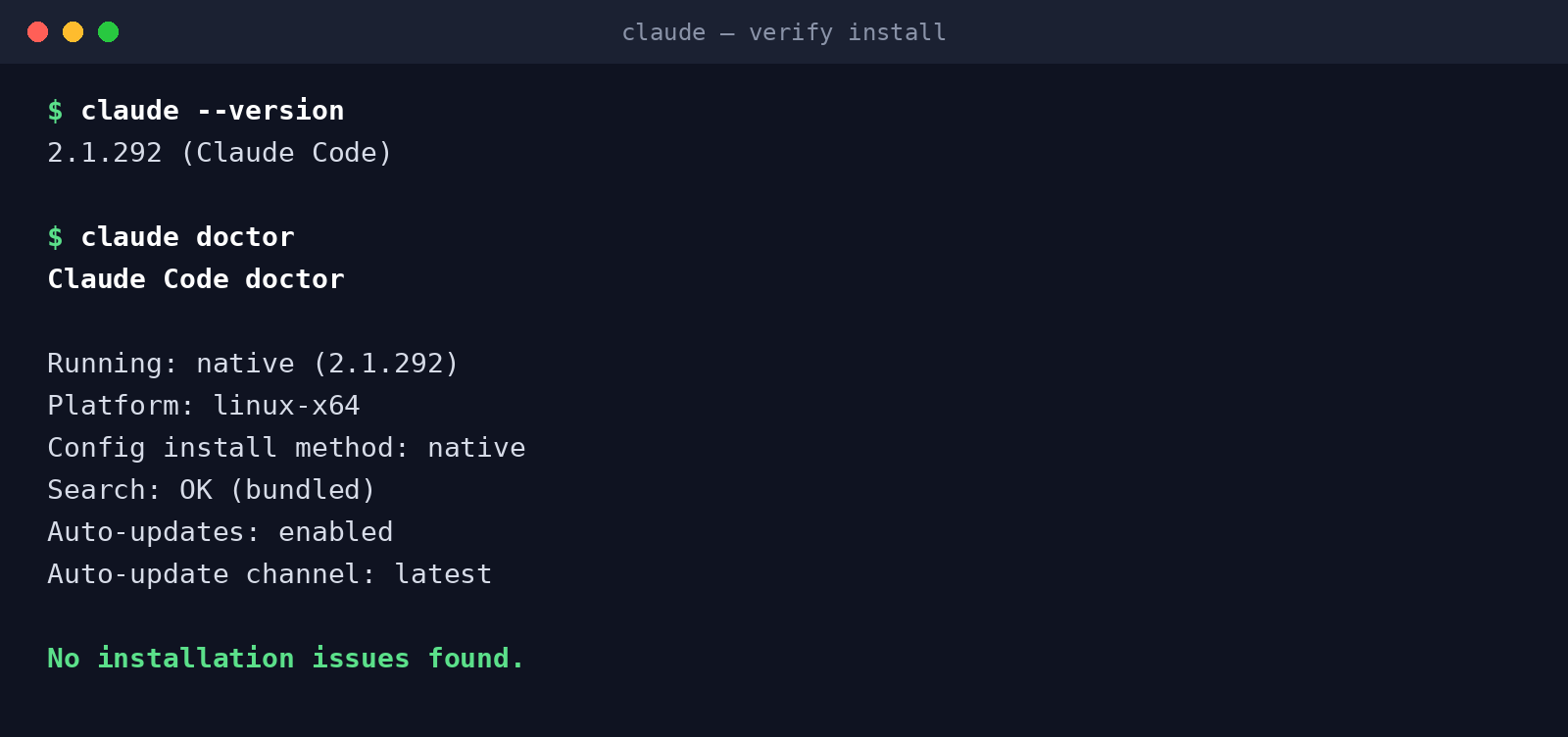 Real output from our test machine, captured on 12 October 2026. Environment-specific lines are trimmed.
Step 3: sign in and run your first task
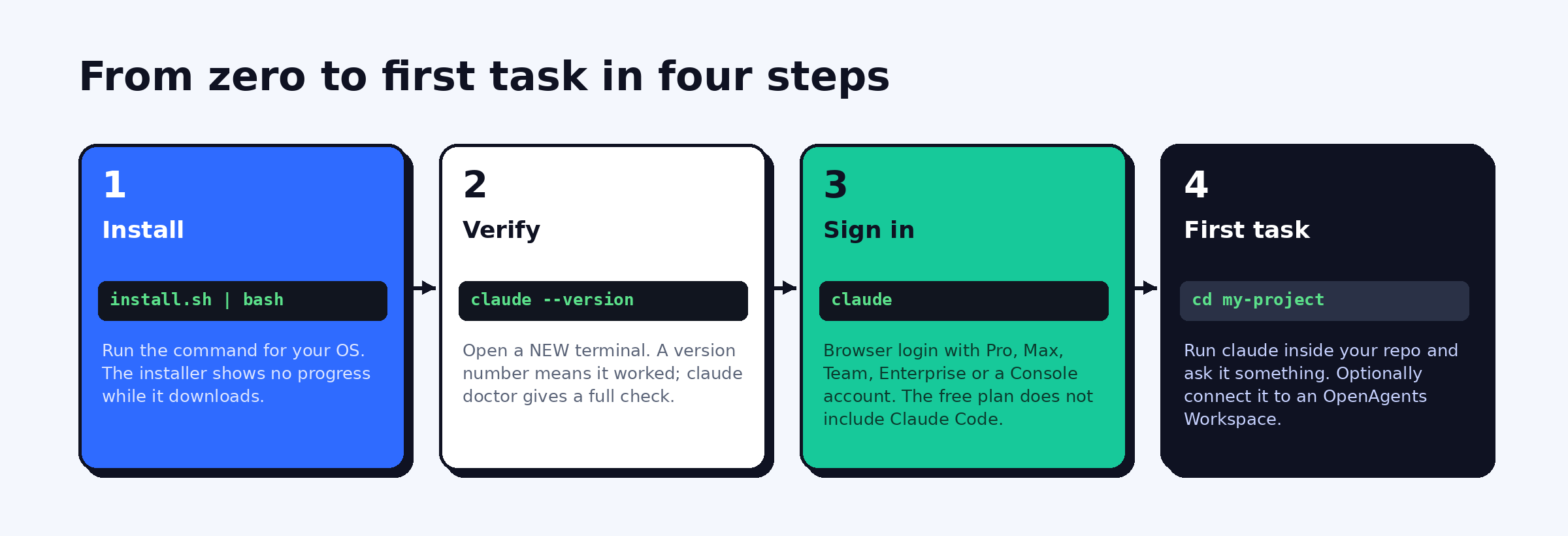
Go to a project directory and start Claude Code:
cd my-project
claude
The first run opens a browser so you can log in with your Claude account. If you have ANTHROPIC_API_KEY set and approve it when asked, Claude Code uses the key and skips the browser login. After that, ask it something about your code:
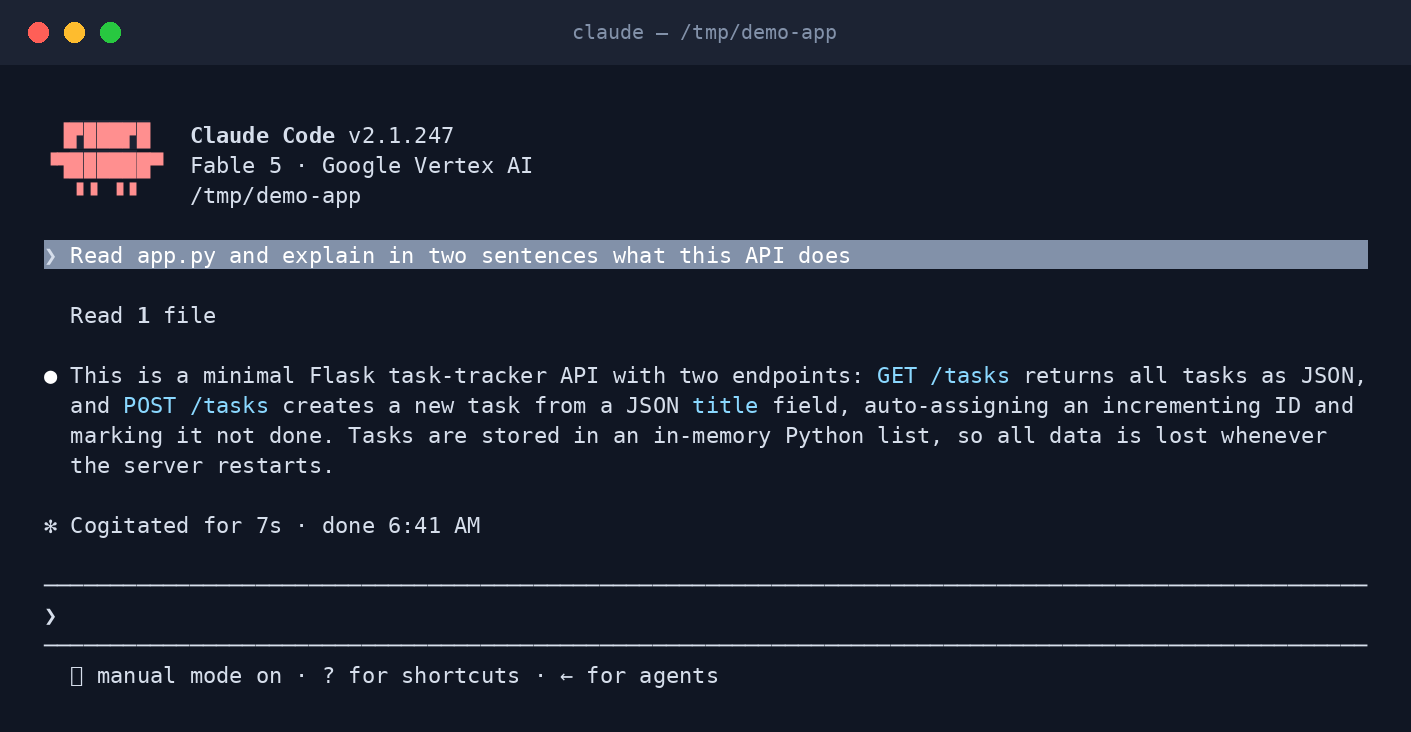 A first question in a fresh project. The status line shows the model and the current permission mode.
Two habits worth starting on day one. Create a CLAUDE.md at the repo root with your build and test commands, which Claude Code reads every session. And leave the default permission mode on until you know which actions you're comfortable auto-approving.
Fix "command not found: claude"
This is the most common install problem, and it almost always means the install directory isn't on your PATH. The installer usually warns you with Native installation exists but ~/.local/bin is not in your PATH.
On macOS and Linux, check and fix it like this:
ls ~/.local/bin/claude                      # is the program there?
echo $PATH | tr ':' '\n' | grep -Fx "$HOME/.local/bin"   # is the folder on PATH?

# If the second command prints nothing, add it (pick your shell's file):
echo 'export PATH="$HOME/.local/bin:$PATH"' >> ~/.zshrc    # zsh (macOS default)
echo 'export PATH="$HOME/.local/bin:$PATH"' >> ~/.bashrc   # bash
Then open a new terminal. A terminal inside VS Code or another editor takes its PATH from the editor, so quit and reopen the editor too.
On Windows, add %USERPROFILE%\.local\bin to your user PATH:
$p = [Environment]::GetEnvironmentVariable('PATH', 'User')
[Environment]::SetEnvironmentVariable('PATH', "$p;$env:USERPROFILE\.local\bin", 'User')
Other common errors are quick to spot. The token '&&' is not a valid statement separator means you pasted the CMD command into PowerShell. 'irm' is not recognized means the reverse. If claude runs but shows an old version, you probably have a second install, often an old npm one, earlier on your PATH; remove it.
Updating Claude Code
Native installs update automatically in the background and apply the new version on the next start. You can choose the release channel with /config, or with "autoUpdatesChannel": "stable" in settings.json, to get builds that are about a week old and skip major regressions. Homebrew users run brew upgrade claude-code, WinGet users run winget upgrade Anthropic.ClaudeCode, and apt, dnf and apk users upgrade through the package manager.
Uninstalling
For a native install on macOS, Linux or WSL:
rm -f ~/.local/bin/claude
rm -rf ~/.local/share/claude
Homebrew: brew uninstall --cask claude-code. WinGet: winget uninstall Anthropic.ClaudeCode. On native Windows, delete %USERPROFILE%\.local\bin\claude.exe and the %USERPROFILE%\.local\share\claude folder.
The no-terminal route: OpenAgents Launcher
If you'd rather not touch install scripts or PATH, the OpenAgents Launcher installs Claude Code from its Agents tab with one click and keeps it updated. It's also the quickest way to run Claude Code alongside other agents. Pair your machine with an OpenAgents Workspace and Claude Code joins shared threads, where you and your team can hand it tasks with an @mention from the browser or your phone.
Comparing options first? Read our Codex vs Claude Code breakdown, or see the Claude Code and Codex CLI agent pages.
FAQ
How do I install Claude Code on Mac?
Open Terminal and run curl -fsSL https://claude.ai/install.sh | bash, then open a new window and run claude --version. Homebrew also works: brew install --cask claude-code.
How do I install Claude Code on Windows?
In PowerShell run irm https://claude.ai/install.ps1 | iex, or use winget install Anthropic.ClaudeCode. No admin rights are needed. Install Git for Windows if you want the Bash tool, or run the Linux installer inside WSL 2.
Do I need Node.js to install Claude Code? No. The native installer, Homebrew and WinGet need no Node.js. Only the deprecated npm method does.
Is Claude Code free? The software is free to install, but it needs a Claude Pro, Max, Team or Enterprise plan or a pay-as-you-go Console account. The free claude.ai plan does not include Claude Code.
Why does my terminal say "claude: command not found" after installing?
The install folder, ~/.local/bin on macOS and Linux or %USERPROFILE%\.local\bin on Windows, isn't on your PATH. Add it, then open a new terminal or restart your editor.
How do I update or uninstall Claude Code?
Native installs update themselves. Homebrew, WinGet and Linux packages update through their package manager. To uninstall a native install, delete ~/.local/bin/claude and ~/.local/share/claude.