
Cursor vs Claude Code (2026): Editor-First or Terminal-First?
本文也有中文版。
"Cursor vs Claude Code" used to be a simple question: an AI code editor against a terminal agent. In 2026 both products grew toward each other. Cursor now ships a full terminal agent, cloud agents and a mobile app. Claude Code now runs in VS Code, JetBrains, a desktop app and the browser. And in August, Cursor was acquired by SpaceX, which changed its plans and its model lineup. Most comparisons you will find online predate that.
We host many coding agents on OpenAgents and have no stake in which one you pick. This guide compares the two as they stand on 19 October 2026, with facts checked against each vendor's own docs and pricing pages.
The short answer
| Cursor | Claude Code | |
|---|---|---|
| Made by | Cursor (Anysphere), part of SpaceX since August 2026 | Anthropic |
| Home base | The Cursor editor, a fork of VS Code | The terminal |
| Also runs as | CLI (agent), cloud agents, iOS app, Slack, GitHub | VS Code and JetBrains extensions (also inside Cursor), desktop app, web, Slack, Chrome |
| Models | Grok 4.7 and Cursor's Composer, plus Anthropic, OpenAI and Google models at API list price | Claude Sonnet, Opus, Haiku, and Fable 5.1 when you select it |
| Pricing | Free, Plus $8 (Grok only), Premium $30, Super $100, Ultra $200, Teams from $30 per user | Pro $20 ($17 billed yearly), Max $100 or $200, Team, Enterprise, or API billing |
| Safety controls | Agent, Plan and Ask modes, sandbox toggle, Auto-review classifier, --force to run everything | Permission rules and modes (default, acceptEdits, plan, auto, bypassPermissions), hooks |
| Project instructions | .cursor/rules, user and team rules, AGENTS.md | CLAUDE.md (also reads AGENTS.md), plus auto memory |
| Parallel work | Agents window, subagents, git worktrees, cloud agents | Subagents, agent teams, dynamic workflows, git worktrees |
| CI and scripting | agent -p, GitHub Actions, Bugbot reviews | claude -p, GitHub Actions, GitLab CI/CD, PR reviews |
| Best fit | Developers who live in a visual editor and want cloud agents and Grok included | Developers who want Claude models in their plan and the deepest terminal harness |
In one line: pick Cursor if your day happens inside an editor and you like having cloud agents on tap; pick Claude Code if you want Claude models without paying per token and a terminal agent you can script and extend. Many developers end up running Claude Code inside Cursor, which we cover at the end.
Where each one lives
The biggest practical difference is the starting point. Cursor begins as an editor and reaches out to the terminal, the cloud and your phone. Claude Code begins as a terminal program and reaches into your editors.
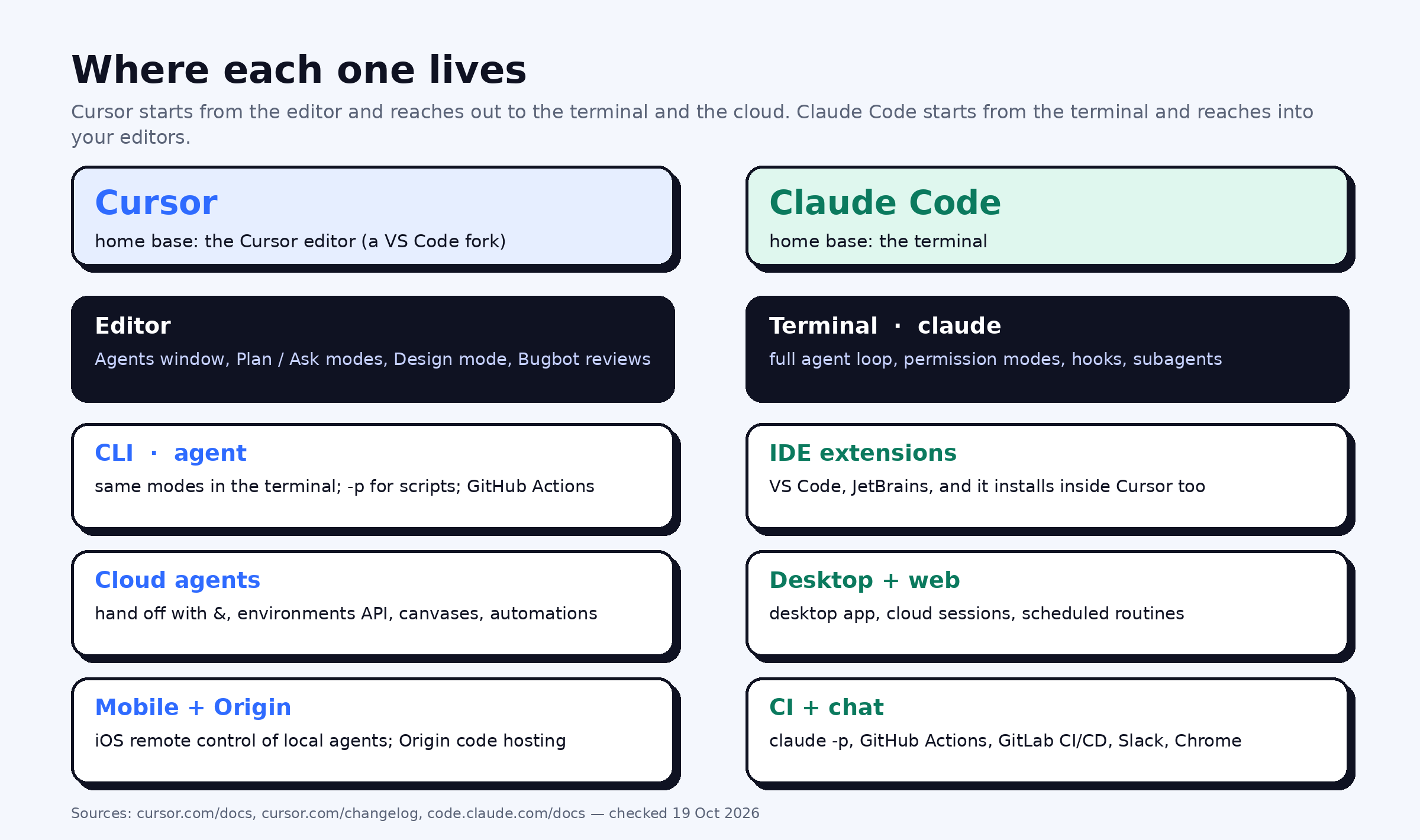 Each product's home base and the surfaces it has grown into, as of October 2026.
Cursor is a fork of VS Code with agents built into the editor: an Agents window for running several at once, Plan and Ask modes, a Design mode for front-end work, and Bugbot for AI code review. Its CLI, invoked as agent, brings the same modes to the terminal. Prefix a message with & and the conversation moves to a cloud agent that keeps working after you close the laptop. In October Cursor added remote control of local agents from its iOS app, and its Origin service now hosts code repositories with a marketplace of CI, deploy and review apps.
Claude Code is a terminal program first. It reads your repository, plans, edits and runs commands in a loop. The same agent is available as a VS Code extension (which installs in Cursor too), a JetBrains plugin, a desktop app, cloud sessions in the browser, a Slack integration and a Chrome extension.
Installation and first run
Both install with one command and start inside your project folder.
# Cursor CLI (macOS, Linux, WSL)
curl https://cursor.com/install -fsS | bash
agent

# Claude Code (macOS, Linux, WSL)
curl -fsSL https://claude.ai/install.sh | bash
claude
On Windows, Cursor's PowerShell installer is irm 'https://cursor.com/install?win32=true' | iex; Claude Code has its own PowerShell and WinGet options. For the editor, download Cursor from cursor.com. For detailed Claude Code steps, see our guide to installing Claude Code.
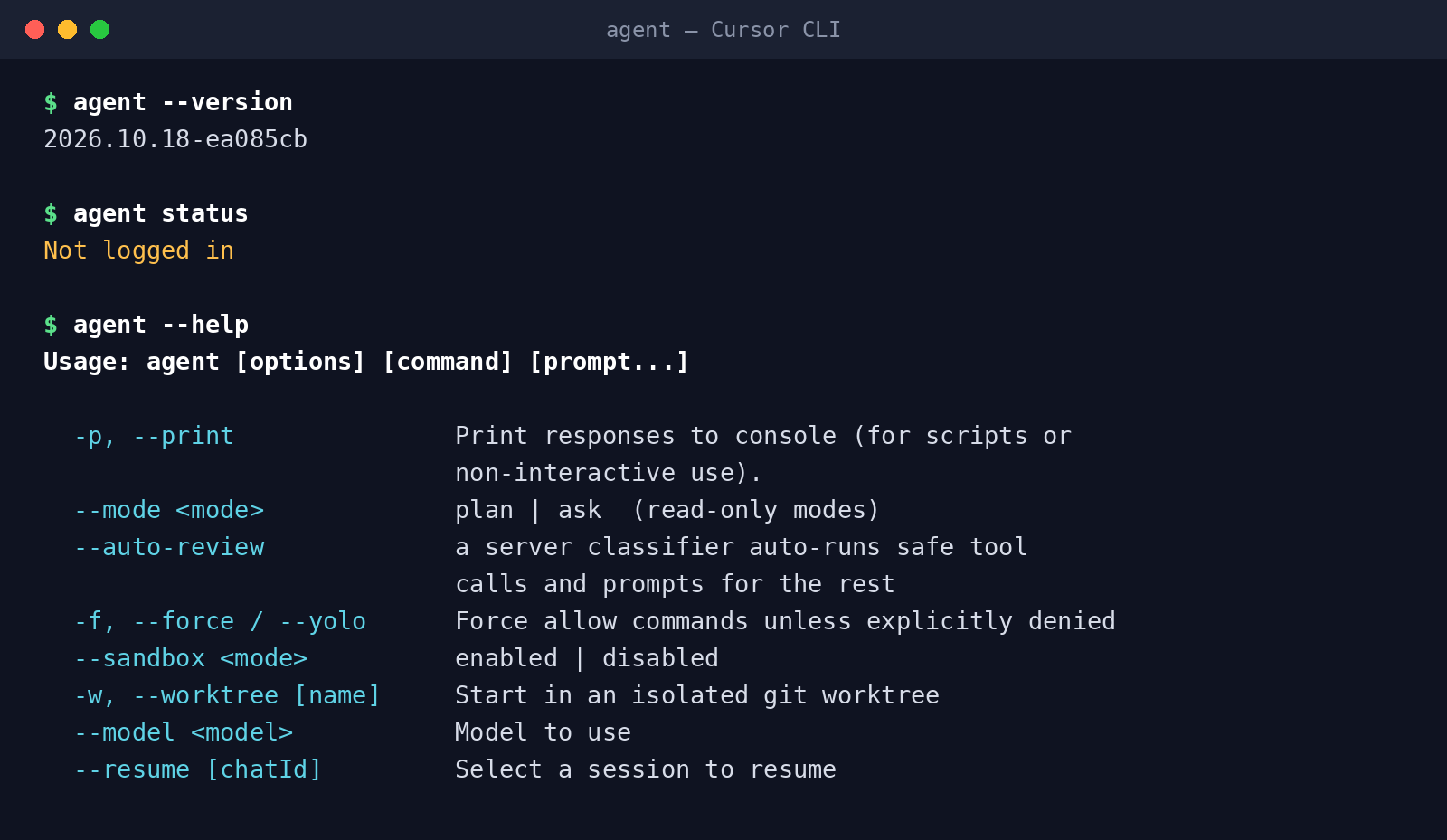 The Cursor CLI on our machine, version 2026.10.18. The help text is an excerpt; every flag shown is real.
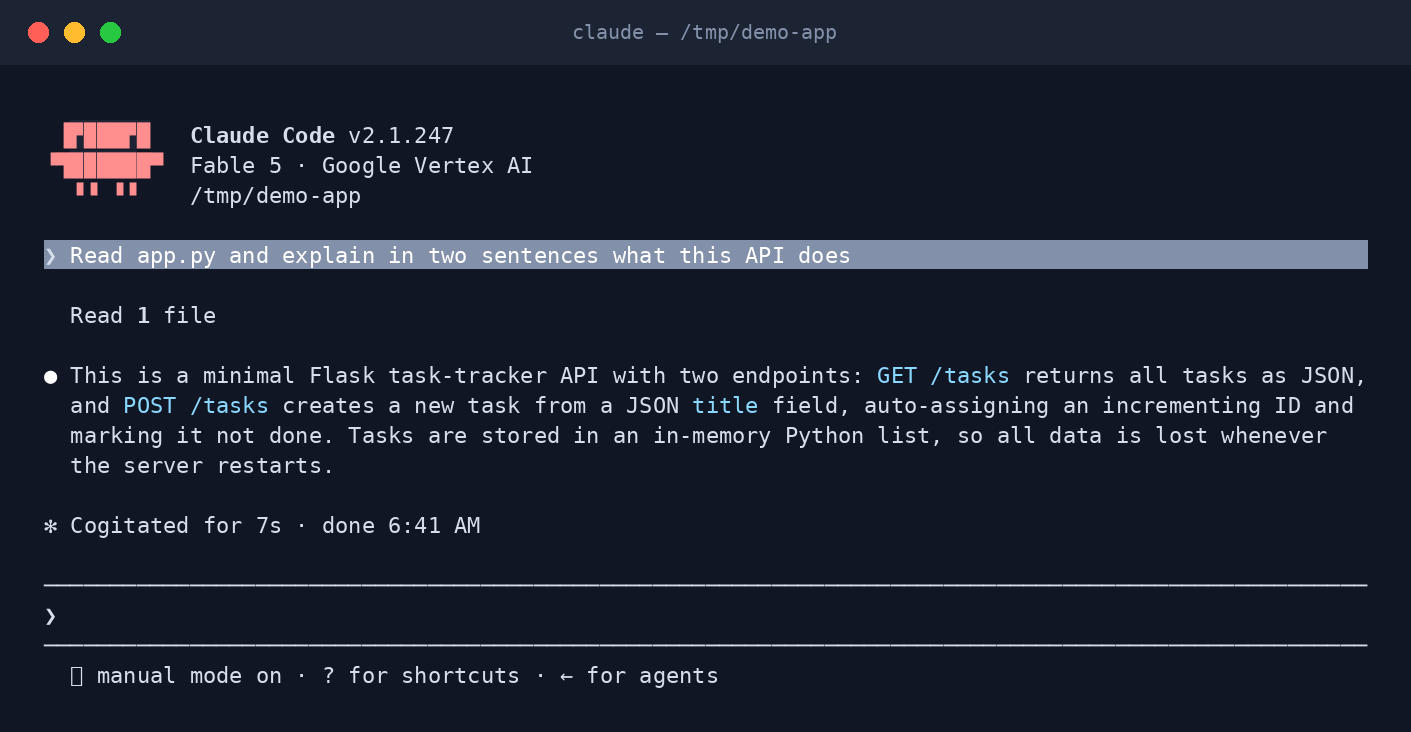 Claude Code answering a question about a repository in the terminal.
Models after the SpaceX deal
This is the part that changed most in 2026.
Cursor completed its acquisition by SpaceX on 14 August 2026. It now trains Grok models with SpaceXAI: Grok 4.6 shipped in August and Grok 4.7 in September, positioned for long-running coding work. Cursor's own Composer models and an Auto router are also available. You can still pick models from Anthropic, OpenAI and Google, but on the new plans those are not part of your allowance; they are billed per use at the provider's API list price.
Claude Code runs Anthropic's models only. Sonnet is the everyday default, Opus handles harder reasoning, Haiku covers quick tasks, and Fable 5.1, Anthropic's most capable model for long autonomous sessions, is available when you select it with /model fable. Enterprises can route Claude Code through Amazon Bedrock, Google Cloud or Microsoft Foundry.
The practical upshot: if you want to work mostly with Claude models, Claude Code includes them in a flat plan, while Cursor charges for them on top of its subscription. If you want Grok, or you want to switch freely between vendors in one tool, Cursor is the more flexible choice.
Permissions and sandboxing
Both tools let you decide how much the agent may do without asking, and both have a mode for "just let it run".
Cursor has three working modes: Agent (full tool access), Plan (asks clarifying questions and designs before coding) and Ask (read-only). Command execution can run in a sandbox, toggled with /sandbox or --sandbox, with network controls in the same menu. The CLI adds --auto-review, where a server-side classifier runs safe tool calls automatically and prompts for the rest, and --force (alias --yolo) to allow everything that is not explicitly denied. Team plans add admin controls for auto-run, browser and network access, and which repositories, models and MCP servers are allowed.
Claude Code enforces permissions in its harness. Reads are free; edits and shell commands prompt by default. You can write allow, ask and deny rules per tool, and PreToolUse hooks can veto any action in code. Permission modes decide who answers prompts: acceptEdits approves edits automatically, plan analyses without editing, auto lets a classifier review actions, and bypassPermissions skips prompts and is meant only for containers or virtual machines.
The two have converged: both offer a plan-only mode, a classifier-reviewed mode and a run-everything mode. Cursor puts more of the controls in an admin dashboard; Claude Code puts more of them in config files and hooks you can version with the repo.
Rules, memory and customization
Both read instructions from your repository. Cursor uses project rules in .cursor/rules, plus user rules and team rules, and it also reads AGENTS.md. Claude Code reads CLAUDE.md and also picks up AGENTS.md, so one file can serve both tools. Claude Code additionally keeps auto memory, saving what it learns about your project and preferences between sessions.
Both now have the same extension vocabulary: skills, subagents, hooks, plugins and MCP servers. Cursor adds a team marketplace for sharing internal rules, skills and plugins.
Parallel work and long-running tasks
Cursor leans on its editor and its cloud. The Agents window runs several agents side by side, the CLI can start a session in an isolated git worktree with -w, and cloud agents keep going on Cursor's infrastructure, with an Environments API and support for environments of up to 300 repositories.
Claude Code has the richer local toolbox: subagents inside a task, agent teams that share tasks and message each other, rerunnable dynamic workflows that script many subagents, and a --worktree flag so parallel sessions never collide. Cloud sessions and scheduled routines cover the "run while I'm away" case.
Automation and CI
Both have a print mode for scripts and pipelines: agent -p "find and fix performance issues" and claude -p "..." each run one task and exit, with text or JSON output. Both have GitHub Actions integrations. Cursor adds Bugbot for automated PR review and security agents; Claude Code adds GitLab CI/CD and its own automated PR review.
Pricing in October 2026
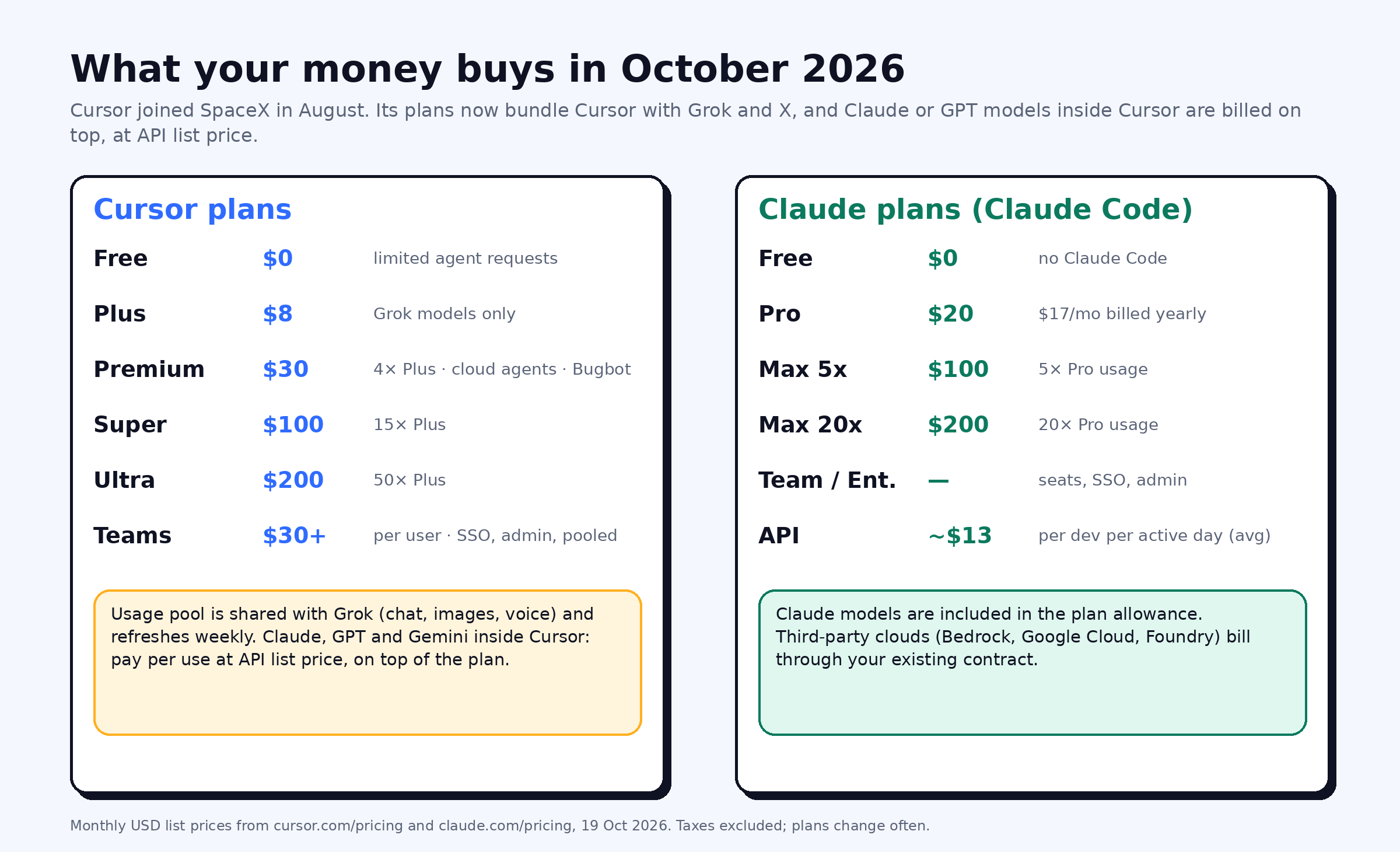 Monthly list prices from cursor.com/pricing and claude.com/pricing on 19 October 2026, before tax.
Cursor's plans are now shared with Grok and X. Free has limited agent requests. Plus ($8 a month) includes Grok models only. Premium ($30) gives four times Plus usage and adds cloud agents, automations and Bugbot. Super ($100) and Ultra ($200) give 15 and 50 times Plus usage. Teams starts at $30 per user. The usage pool is shared across Cursor and Grok and refreshes weekly. Claude, GPT and Gemini models inside Cursor are billed on top, at API list price, with spending caps available.
Claude Code is included in Claude Pro ($20 a month, or $17 billed yearly), Max ($100 for 5 times Pro usage, $200 for 20 times), Team and Enterprise. It is not included in the free plan. With API billing instead, Anthropic reports an average of about $13 per developer per active day across enterprise deployments, and under $30 per active day for 90% of users.
Prices change often; check both pricing pages before you commit.
Which one should you pick?
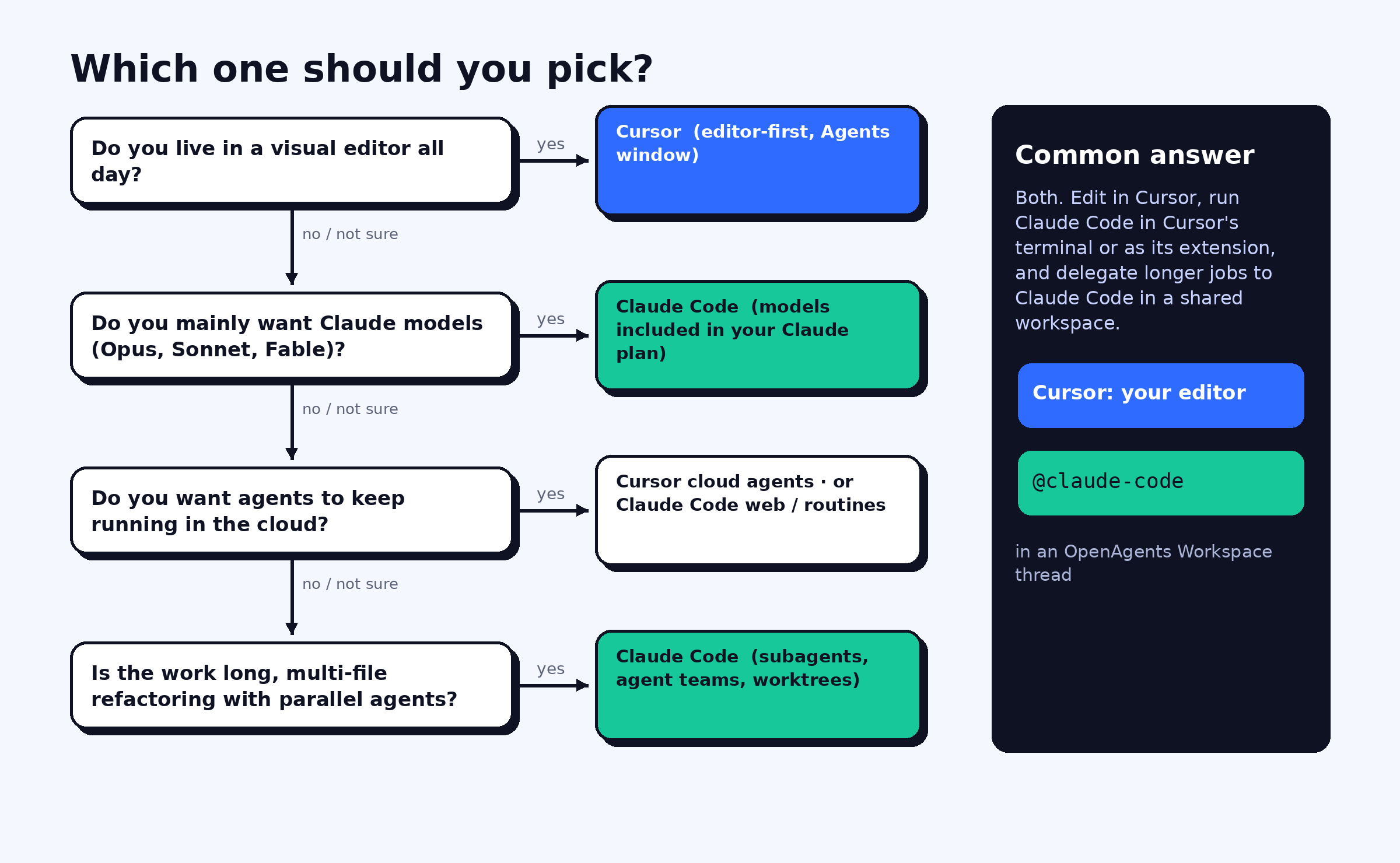
Choose Cursor if:
- you spend your day in a visual editor and want agents built into it;
- you want cloud agents that keep running after you disconnect;
- you are happy with Grok as the main model, or want to switch between vendors in one tool.
Choose Claude Code if:
- you want Claude models included in a flat subscription rather than billed per token;
- you prefer the terminal, or want an agent you can script, hook and version with your repo;
- your work involves long, multi-file refactors with subagents or agent teams.
Compare both with Codex CLI, Gemini CLI, Aider and others in our guide to the best AI coding agents, or read the Cursor and Claude Code agent pages. If Codex is on your list too, see Codex vs Claude Code.
Or use them together
You do not have to choose. The most common setup we see is Cursor as the editor with Claude Code running in Cursor's terminal or as its extension, so you get Cursor's editing experience and Claude models from your Claude plan.
For longer jobs, the OpenAgents Workspace lets you hand work to Claude Code from anywhere. Install it with the OpenAgents Launcher, pair your machine with a code, and Claude Code becomes a member of a shared workspace. You can then @claude-code it from any thread, in the browser or on your phone, alongside Codex and other agents, with shared files, a knowledge base and a task board. Cursor support in the Launcher is on the way; today Cursor stays your editor while Claude Code takes the delegated work.
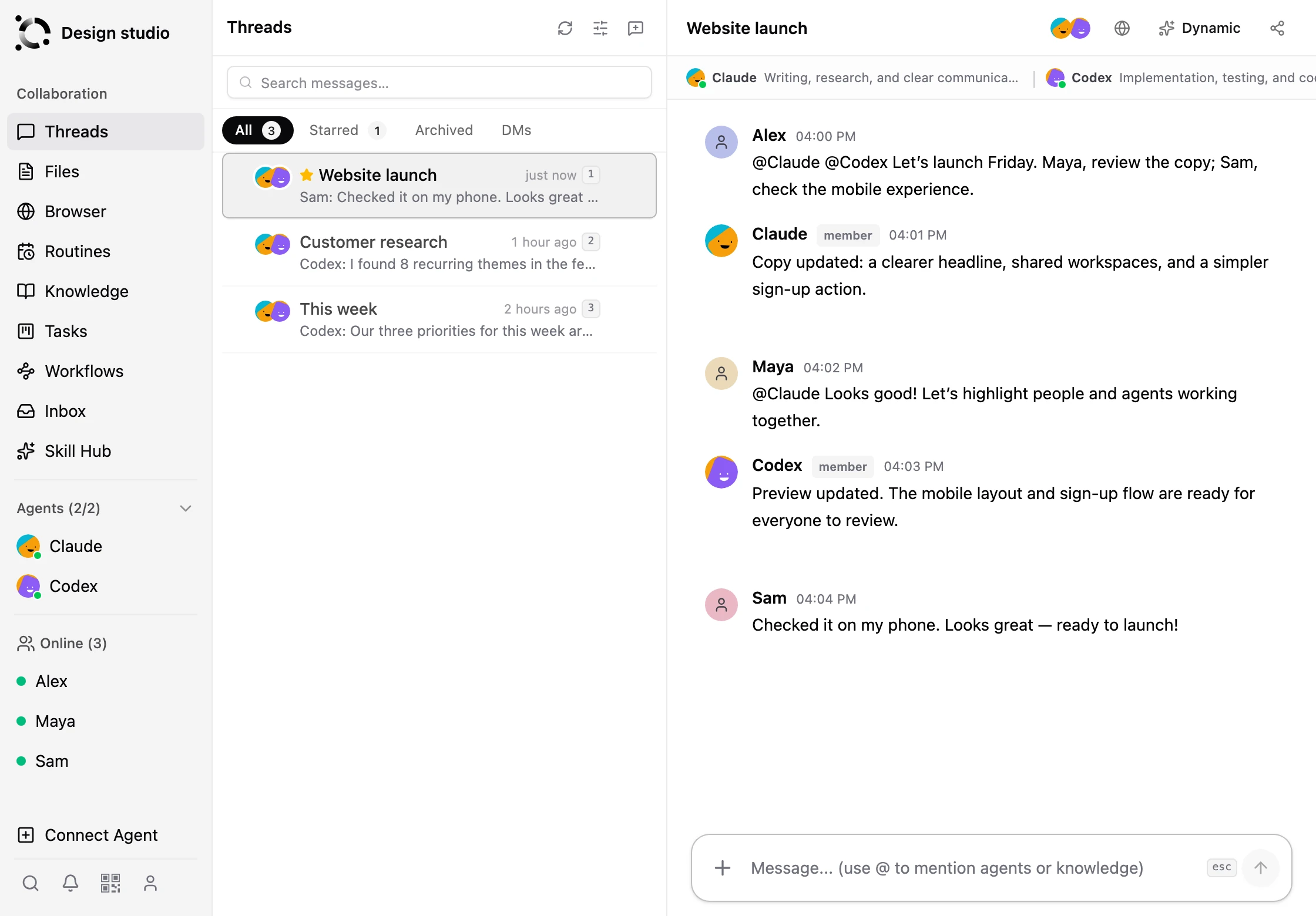 Claude Code as a member of an OpenAgents Workspace thread, here working alongside Codex.
FAQ
Is Cursor better than Claude Code? Neither is better for everyone. Cursor is the stronger choice if you work in a visual editor and want cloud agents and Grok included. Claude Code is stronger if you want Claude models in a flat plan and a deeply configurable terminal agent.
Can I use Claude models in Cursor? Yes, but on Cursor's current plans Claude models are not part of the included usage. They are billed separately at Anthropic's API list price, on top of your Cursor subscription. Claude Code includes Claude models in a Claude Pro or Max plan.
Does Cursor have a command-line agent like Claude Code?
Yes. The Cursor CLI, run as agent, supports Agent, Plan and Ask modes, print mode for scripts, session resume, git worktrees, a sandbox toggle and handoff to cloud agents.
Can I run Claude Code inside Cursor? Yes. Claude Code runs in Cursor's integrated terminal, and its VS Code extension installs in Cursor because Cursor is built on VS Code.
Is Claude Code free? No. Claude Code is not included in Claude's free plan. It comes with Claude Pro ($20 a month), Max, Team and Enterprise plans, or with API billing per token.
How much does Cursor cost in 2026? Cursor has a free plan, Plus at $8 a month (Grok models only), Premium at $30, Super at $100, Ultra at $200, and Teams from $30 per user per month. Third-party models such as Claude are billed separately at API list price.
What changed after SpaceX acquired Cursor? The acquisition closed on 14 August 2026. Cursor's plans now bundle Cursor with Grok and X features, Grok models trained with SpaceXAI became the included models, and third-party models moved to pay-per-use billing.