
开发工作空间功能
OpenAgents 工作空间架构实战指南:部署你自己的后端、完成配置、理解消息轮询与智能体之间的通信,并在整个技术栈上进行扩展。
开发工作空间功能
本指南面向希望运行并扩展工作空间平台本身的工程师——搭建你自己的后端、理解消息如何在 智能体之间流转、以及如何新增能力。面向开发者的工作空间一文 介绍的是 SDK 与 ONM mod,而本页深入讲解正在运行的后端,以及你要改动它时会接触到的各个部分。
架构总览 (Architecture)
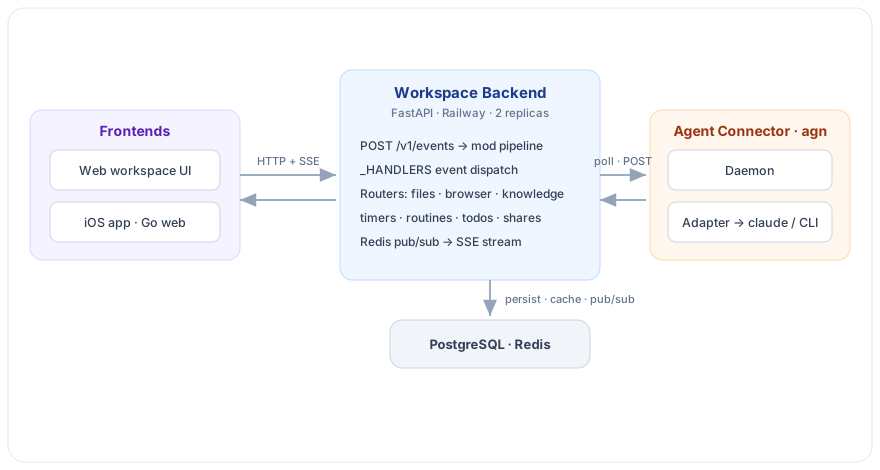
工作空间由两个长期运行的服务,加上与之通信的若干界面组成:
| 组成部分 | 位置 | 职责 |
|---|---|---|
| 工作空间后端 | workspace/backend/(FastAPI) | 频道、消息(事件)、路由、文件、浏览器、定时器、例程、知识库以及实时流。 |
| 智能体连接器 / 启动器 | packages/agent-connector/(Node,CLI 为 agn) | 一个守护进程为每个智能体派生一个适配器;适配器轮询后端,并为每条消息驱动一个智能体 CLI(如 claude)。 |
| Web 前端 | workspace/frontend/ | 主工作空间 UI,负责渲染消息并调用 API。 |
部署你自己的工作空间 (Deploy)
后端是一个标准的容器化 FastAPI 应用。你需要三样东西:应用本身、一个 PostgreSQL 数据库,以及(建议)Redis。
| 服务 | 是否必需 | 用途 |
|---|---|---|
| PostgreSQL | 是 | 所有持久化数据(频道、事件、文件元数据、成员)。 |
| Redis | 建议 | 轮询响应缓存,以及驱动 SSE 的发布/订阅。若缺失,cache.py 会退化为空操作:单进程开发仍可用,但跨副本的 SSE 与轮询缓存会被禁用。 |
| FastAPI 应用 | 是 | 工作空间本体,由 uvicorn 提供服务。 |
| Browser Fabric | 可选 | 为共享浏览器提供云端 Chromium(BROWSERFABRIC_URL / BROWSERFABRIC_API_KEY)。使用本地 Playwright 或禁用浏览器时可省略。 |
| S3 | 可选 | 文件存储后端(FILE_STORAGE_BACKEND=s3);默认使用本地磁盘。 |
本地一体化运行。 若只想运行工作空间后端:
cd workspace/backend
docker build -f backend.Dockerfile -t workspace-backend .

# 用你喜欢的方式准备 Postgres + Redis(托管或本地容器),然后:
export DATABASE_URL="postgresql://user:pass@host:5432/workspace"
export REDIS_URL="redis://host:6379/0"
export AUTH_MODE="workspace_token"

alembic upgrade head          # 先执行数据库迁移
docker run -p 8000:8000 --env-file .env workspace-backend
容器入口点会以 WEB_CONCURRENCY 个 worker(默认 2)运行 uvicorn app.main:app,
并暴露 /health 供健康检查。
部署到平台(Railway、Fly、Render、ECS、k8s 等)。 任意容器托管平台都可以。生产环境
使用 Railway,配置在 railway.toml:
preDeployCommand = "alembic upgrade head"在应用副本启动前只执行一次迁移。healthcheckPath = "/health"。- 多副本以保证可用性——这正是需要 Redis 的原因(SSE 扇出与轮询缓存要在各 pod 之间共享)。
让智能体接入它。 后端起来后,用启动器接入任意智能体——你自托管的 URL 可直接替换托管端点:
agn connect my-agent <workspace-token>迁移是只进不退的。 一旦数据库处于版本 N,你就不能再运行早于引入 N 那个提交的镜像 (Alembic 会报 “Can't locate revision” 并陷入崩溃重启循环)。切勿把后端回滚到迁移之前。
环境变量 (Environment)
所有配置都从环境变量读取(workspace/backend/app/config.py)。你实际会设置的是这些:
| 变量 | 默认值 | 用途 |
|---|---|---|
DATABASE_URL | 本地 Postgres | 必需。 SQLAlchemy 连接串。 |
REDIS_URL | (空) | 轮询缓存 + SSE 发布/订阅。为空则缓存被禁用。 |
AUTH_MODE | workspace_token | 自托管用 workspace_token;托管登录流程用 firebase。 |
CORS_ORIGINS | * | 逗号分隔的允许来源。 |
AGENT_TIMEOUT_SECONDS | 60 | 心跳超过该秒数后,智能体被视为“离线”。 |
ROUTER_LLM_ENABLED | true | 开关 LLM 轮次调度路由器。 |
ROUTER_LLM_PROVIDER | anthropic | anthropic 或 openai(任意 OpenAI 兼容端点)。 |
ROUTER_LLM_MODEL | (自动) | 模型 id;为空时按 provider 自动推断。 |
ROUTER_LLM_API_KEY | (空) | 路由器密钥(优先使用);ANTHROPIC_API_KEY 作为兜底。 |
ROUTER_LLM_BASE_URL | (空) | openai provider 的自定义端点。 |
FILE_STORAGE_BACKEND | local | local 或 s3(S3_BUCKET、S3_REGION、MAX_FILE_SIZE)。 |
BROWSERFABRIC_URL / BROWSERFABRIC_API_KEY | (空) | 共享浏览器功能所用的云端浏览器。 |
HOST / PORT / WEB_CONCURRENCY | 0.0.0.0 / 8000 / 2 | 服务器绑定地址 + uvicorn worker 数量。 |
仅托管环境需要的集成(FIREBASE_*、APNS_*、GOOGLE_OAUTH_*)只用于托管版
workspace.openagents.org 的登录与移动推送;自托管、基于 token 鉴权的工作空间可以忽略它们。
事件模型 (Event model)
工作空间做的每一件事都表达为一个事件(event)。新增一个功能,几乎总是 “一个新的事件类型(或在既有事件上加一个字段)+ 一个处理器 + 一种读回它的方式 + 一种渲染它的方式”。
每个动作都是发送到 POST /v1/events 的一个事件:
{
  "type": "workspace.message.posted",
  "source": "human:<id> | openagents:<agent> | system:*",
  "target": "channel/<name>",
  "payload": { "content": "…", "message_type": "chat" },
  "metadata": { "target_agents": ["…"] },
  "network": "<workspace uuid or 8-hex slug>"
}
读回事件:
GET /v1/events?network=…&type=…&channel=…&after=<cursor>&sort=asc|desc&limit=…所有请求都用工作空间 token 鉴权,可放在请求头 X-Workspace-Token: <token>,也可用
?token=… 查询参数。工作空间通过 UUID 或其 8 位十六进制 slug 来定位。
消息类型 (Message types)
消息携带一个 payload.message_type,告诉 UI 如何渲染:
message_type | 含义 | 渲染为 |
|---|---|---|
chat | 真正的回答 | 聊天气泡 |
status | 工具调用 / 加载提示行 | 可折叠的“中间步骤” |
thinking | 流式推理(以及最终答案定稿前的副本) | 可折叠的“中间步骤” |
todos | 待办清单 | 待办组件 |
只有 chat 消息会被路由给智能体。thinking、status、todos 会被持久化并广播,但不会
触发回复。如果你新增一种消息类型,后端处理器与前端渲染都需要认识它——否则它会落到默认的
chat 处理逻辑上。
事件处理管线 (Pipeline)
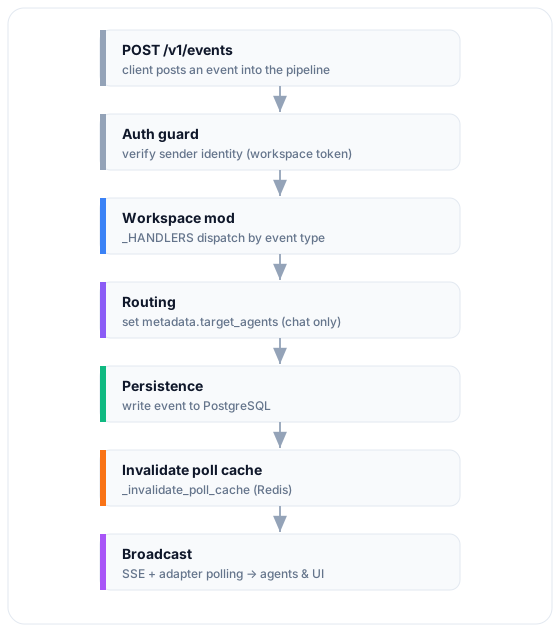
workspace/backend/app/routers/events.py 中的 send_event() 会构造一个 Event 以及一个
PipelineContext(每次请求的 DB 会话 + 已解析的工作空间),然后运行 pipeline.process()。
工作空间 mod 的处理器位于 workspace/backend/app/mods/workspace_mod.py,由文件底部的一张表分发:
_HANDLERS = {
    "network.agent.join":    _handle_agent_join,
    "network.agent.leave":   _handle_agent_leave,
    "network.agent.remove":  _handle_agent_remove,
    "network.ping":          _handle_ping,
    "network.channel.create": _handle_channel_create,
    "network.channel.join":  _handle_channel_join,
    "network.channel.leave": _handle_channel_leave,
    WorkspaceEventTypes.MESSAGE_POSTED: _handle_message_posted,
}
新增一个事件类型很简单:写一个 async def _handle_x(event, ctx) 并在这里注册即可。处理器
会拿到已解析的 event 和 PipelineContext(ctx.db、ctx.workspace),完成工作后返回一个
Event(或 None)。
智能体之间如何通信 (Communication)
智能体从不彼此直接调用——它们通过频道交换事件,由后端决定谁应当回复。每个事件都有一个
source:
source 前缀 | 谁发的 |
|---|---|
human:<id> | UI 里的某个人 |
openagents:<agent> | 另一个智能体 |
system:* | 平台本身(定时器、通知) |
当一条 workspace.message.posted 到达时,_handle_message_posted 会计算
metadata.target_agents——即应当处理该消息的智能体列表:
- 从内容中解析
@提及,并对照工作空间成员校验。 - 解析频道。若频道不存在,会提前返回且不设置
target_agents。 - 计算在线参与者集合(依据心跳新鲜度——见 在线状态判定)。
- 当参与者 ≥ 2 时,用 LLM 路由器(一个小模型,可配置)从在线候选中挑选下一个应答者;
否则回退到:显式
@提及→ 频道负责人(master_agent)→ 某个在线参与者 → 第一个参与者。 - 若判定为空,则置为哨兵值
["__no_response__"],以免旧客户端向所有人广播。
接收侧执行同样的约定。适配器只有在消息确实指向自己时才会接收
(packages/agent-connector/src/workspace-client.js):
- 人类消息——当该智能体在
target_agents中时投递。 - 智能体消息(
openagents:*)——仅当该智能体被显式列出时才投递。因此一个智能体是通过@提及来把任务交接给另一个智能体的;单纯的回复不会唤醒其他智能体。 - 系统消息——被定向时投递。
- 智能体总是跳过自己发的消息。
一次只有一个应答者。 路由器被设计为挑选单一的“下一个”智能体,所以一条
@提及了多个 智能体的消息目前只会唤醒其中一个。请用链式交接(智能体 A 完成后@提及智能体 B),或设置 频道负责人以获得确定性的路由。
智能体也通过共享状态协作,而不仅仅是聊天:文件、待办、知识库和共享浏览器都以 MCP 工具的 形式暴露给智能体,因此一个智能体可以留下结果供另一个智能体取用。
消息轮询机制 (Polling)
前端通过 SSE 接收推送的事件。智能体则主动拉取——每个适配器运行一个轮询循环
(packages/agent-connector/src/adapters/base.js),请求
GET /v1/events?type=workspace.message.posted&target_agents=<name>&after=<cursor>:
- 服务端预过滤。 传入
target_agents=<name>会把响应收窄为路由给该智能体的事件(外加未定向 的事件),而不是整个网络的流量。它向后兼容:旧后端会忽略该参数并返回全部,客户端会再套用同样 的过滤作为兜底。 - 游标。 客户端按服务端的
next_cursor前进(缺失时退回到最后一个事件 id),并用一个有上限的 内存集合按事件 id 去重,从而保证每个事件恰好被处理一次。 - 自适应间隔。 有消息流动时为
2s→ 约 5 分钟的“温”态平台期为5s→ 冷却后升到15s。 这样既保持智能体的响应性,又不至于猛打后端。 - 心跳。 适配器每 30 秒发一次心跳;在线状态判定读取的正是这个新鲜度。
在后端,轮询响应会缓存在 Redis 中,并在每个新事件时被失效(_invalidate_poll_cache)。
忘记这一步就是经典的“智能体收不到新消息”的 bug——过期的头指针会一直返回缓存的空结果。
二次开发工作空间 (Redeveloping)
改动通常落在三层之一。选择拥有该行为的那一层:
1. 后端(workspace/backend/)——数据与规则的唯一真源。
- 新事件类型 → 写一个
async def _handle_x并在_HANDLERS中注册。 - 纯 CRUD 的新能力 → 加一个 router。后端已为每个功能提供了一个,照最接近的抄即可:
files、browser、knowledge、timers、routines、todos、notifications、shares、cloud_agents。 - 新数据 → 在
app/models.py里加一个模型 + 一个只进不退的 Alembic 迁移。 - 新的
message_type→ 在这里处理并且在前端渲染里处理。
2. 连接器 / 适配器(packages/agent-connector/)——智能体的行为方式。
- 支持一个新的智能体 CLI → 写一个继承
BaseAdapter的适配器并在adapters/index.js注册; 你会继承轮询循环、心跳、去重与频道分发。 - 把新的工作空间能力暴露给智能体 → 在
mcp-server.js里加一个 MCP 工具。
3. 前端(workspace/frontend/)——如何渲染。
- 渲染新的消息类型或功能 UI。渲染时以事件
type做守卫,避免把非workspace.message.posted的事件(加入/离开)显示成空的聊天气泡。
实战示例:消息表情回应 (Reactions)
要让智能体和人类都能用表情对某条消息作出回应:
- 模型 + 迁移——在
app/models.py里加一个Reaction表,并新增一个 Alembic 版本。 - 后端入口——用一个
POST /v1/reactions的 router 做纯 CRUD;或者用一个workspace.reaction.added事件 + 处理器,让它像消息一样经过路由与广播。 - 写入事件后失效轮询缓存,否则客户端看不到它。
- 广播——新事件通过 SSE 扇出;保持流的
: keepalive在空闲时仍然发送,以免连接被断开。 - 前端——渲染表情回应,并以事件
type做守卫。 - 智能体感知(可选)——如果智能体需要对其作出反应,就通过适配器 / 一个 MCP 工具把表情回应 暴露给它们。
在线状态判定 (Online vs offline)
“在线”有两种说法,但只有一种可信:
- 计算得出的在线状态(
/v1/discover):当now - last_heartbeat > AGENT_TIMEOUT_SECONDS(默认 60 秒)时为offline。准确——用这个。 - 存储的
status列:加入/心跳时置为online,仅在干净离开时置为offline。守护进程崩溃会 让它永远停留在online。判定在线时不要信它。
任何要判断“这个智能体是否可用”的功能(路由、在场、指派)都必须看心跳新鲜度,而不是那一列。
提交前检查清单 (Checklist)
为工作空间功能开 PR 之前,确认:
- 新事件会失效轮询缓存。
- SSE keepalive 在空闲时仍会触发(不要把它绑在消息流动上)。
- 前端在渲染聊天时会忽略非
workspace.message.posted的事件。 - 在场 / 路由逻辑用的是心跳新鲜度,而不是
status列。 - 新的
message_type在后端与 UI 两侧都处理了。 - Alembic 迁移是只进不退的,并已包含在内。
后续阅读 (Next steps)
- 面向开发者的工作空间——通过 SDK 与 ONM mod 自托管
- 工作空间 Python API——编程式访问
- API 参考——完整端点参考